
Spaces:
Runtime error

Runtime error
| # Depth estimation with DepthAnything and OpenVINO | |
| [](https://mybinder.org/v2/gh/eaidova/openvino_notebooks_binder.git/main?urlpath=git-pull%3Frepo%3Dhttps%253A%252F%252Fgithub.com%252Fopenvinotoolkit%252Fopenvino_notebooks%26urlpath%3Dtree%252Fopenvino_notebooks%252Fnotebooks%2Fdepth-anythingh%2Fdepth-anything.ipynb) | |
| [](https://colab.research.google.com/github/openvinotoolkit/openvino_notebooks/blob/latest/notebooks/depth-anything/depth-anything.ipynb) | |
|  | |
| [Depth Anything](https://depth-anything.github.io/) is a highly practical solution for robust monocular depth estimation. Without pursuing novel technical modules, this project aims to build a simple yet powerful foundation model dealing with any images under any circumstances. | |
| The framework of Depth Anything is shown below. it adopts a standard pipeline to unleashing the power of large-scale unlabeled images. | |
| 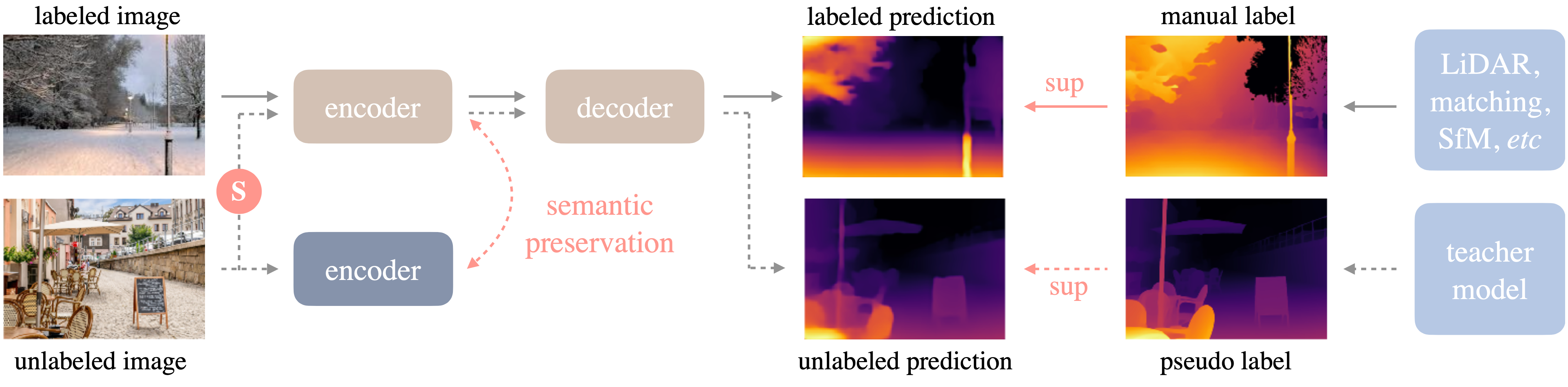 | |
| More details about model can be found in [project web page](https://depth-anything.github.io/), [paper](https://arxiv.org/abs/2401.10891), and official [repository](https://github.com/LiheYoung/Depth-Anything) | |
| In this tutorial we will explore how to convert and run DepthAnything using OpenVINO. An additional part demonstrates how to run quantization with [NNCF](https://github.com/openvinotoolkit/nncf/) to speed up the model. | |
| ## Notebook Contents | |
| This notebook demonstrates Monocular Depth Estimation with the [DepthAnything](https://github.com/LiheYoung/Depth-Anything) in OpenVINO. | |
| The tutorial consists of following steps: | |
| - Install prerequisites | |
| - Load and run PyTorch model inference | |
| - Convert Model to Openvino Intermediate Representation format | |
| - Run OpenVINO model inference on single image | |
| - Run OpenVINO model inference on video | |
| - Optimize Model | |
| - Compare results of original and optimized models | |
| - Launch interactive demo | |
| ## Installation Instructions | |
| This is a self-contained example that relies solely on its own code.</br> | |
| We recommend running the notebook in a virtual environment. You only need a Jupyter server to start. | |
| For details, please refer to [Installation Guide](../../README.md). | |